
Data Wrangling and Manipulation in JS
This guide goes over 3 major concepts:
- Array Operations
- Javascript Objects
- Wrangling in D3
Array Operations
const myArr = [1, 2, 3, 4, 5, 6, 7, 8, 9]
Map
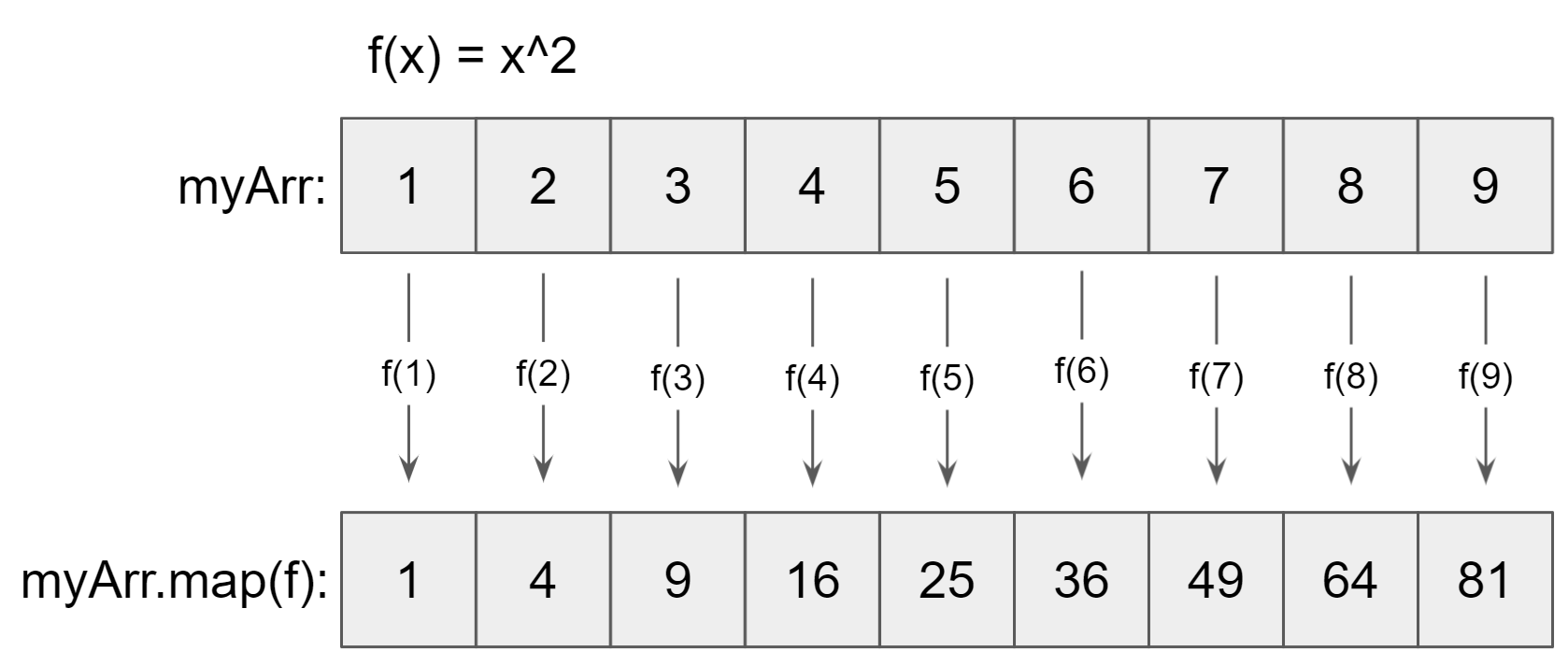
Map applies a function to each element of an array and returns a new array of the function outputs.
Use .map() to return an array of the squares of myArr.
const squares = myArr.map(x => x**2);console.log(squares); // [1, 4, 9, 16, 25, 36, 49, 64, 81]
We can also use more complex functions:
const factorials = myArr.map((x) => {let prod = 1;for (let i = 1; i <= x; ++i) {prod *= i;}return prod;});console.log(factorials); // [1, 2, 6, 24, 120, 720, 5040, 40320, 362880]
The index of each element is passed in as the second item:
const indices = myArr.map((x, i) => i)console.log(indices) // [0, 1, 2, 3, 4, 5, 6, 7, 8]
Filter
The filter operation returns an array of elements from the original array that meet a specified condition.
.filter() returns the true values from the elements passed through a function. The % is the modulus operator which returns the remainder after division. When you divide an even number by 2, there will always be a remainder of zero. Get the even numbers of myArr using .filter().
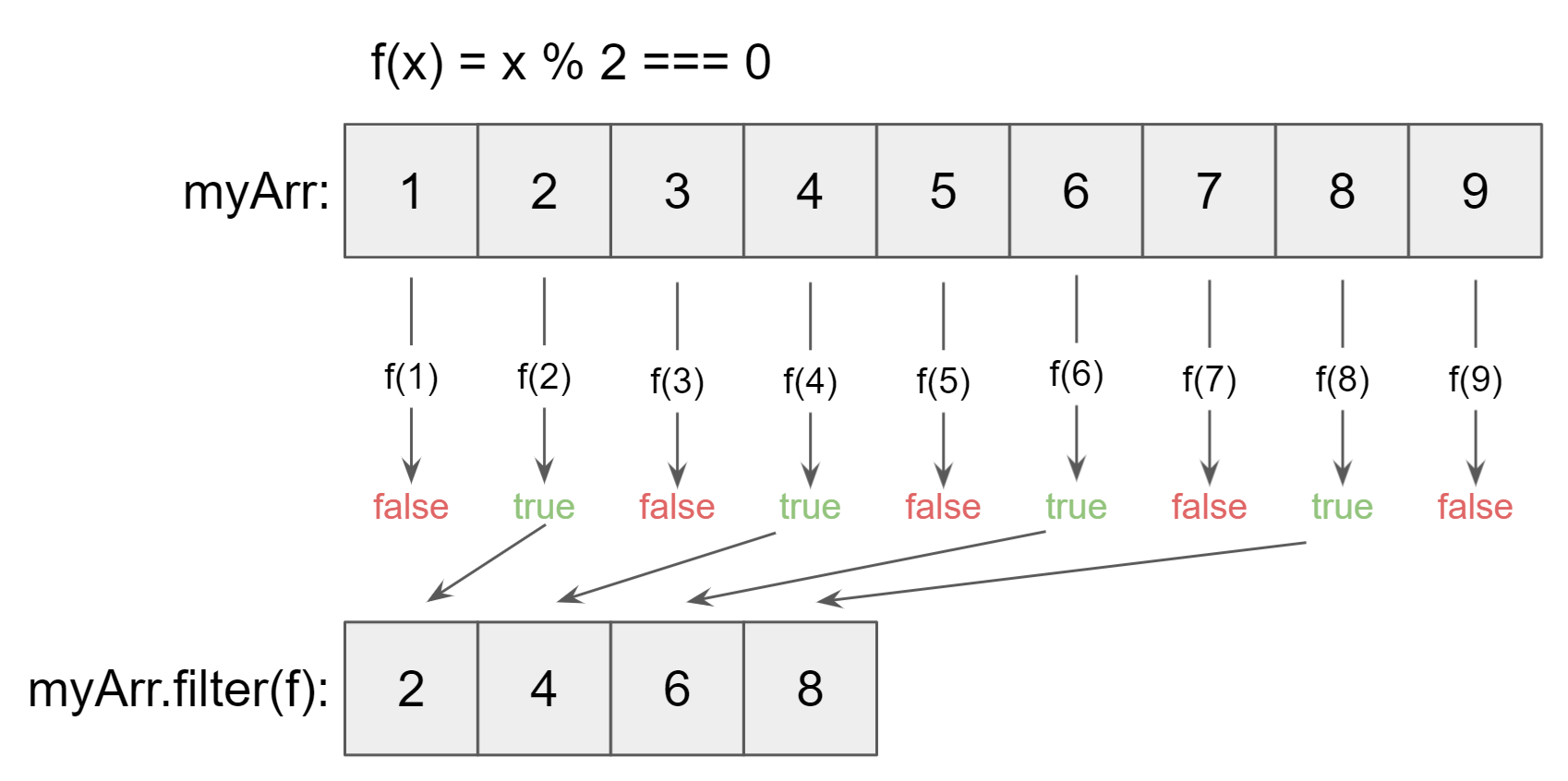
const evenNumbers = myArr.filter(x => x % 2 === 0);console.log(evenNumbers); // [2, 4, 6, 8]
Javascript Objects
Objects are key-value collections of data.
const myObj = {name: "Labyrinth",nWriters: 5};
We can access items by their key:
console.log(myObj.name); // "Labyrinth"
Object Destructuring
We can turn object values into individual variables as follows:
const { name, nWriters } = myObj;console.log(name, nWriters) // "Labyrinth", 5
Wrangling with D3
Oftentimes, our data will be arrays of objects. This array contains data for 3 students.
const students = [{ major: "Math", gpa: 3.00 },{ major: "Compsci", gpa: 3.50 },{ major: "Compsci", gpa: 3.75 }]
d3.max()
We can get the maximum gpa of all students:
import { max } from "d3-array";const maxGpa = max(students, d => d.gpa)console.log(maxGpa) // 3.75
The first argument passed into d3.max() must be an array of values. Then, the second argument can be a function that returns a value for each element of the array.
d3.nest()
Often, we'll want to group data by a common value. Here, we're going to group together students with the same major using d3.nest().
import { nest } from "d3-collection";const nestedData = nest().key((d) => d.major).entries(students)console.log(nestedData)// [// {// key: 'Math',// values: [ { major: 'Math', gpa: 3 } ],// },// {// key: 'Compsci',// values: [// { major: 'Compsci', gpa: 3.5 },// { major: 'Compsci', gpa: 3.75 }// ]// }// ]
Here, we pass a function through .key() for the major value. This tells d3 to group the data by major. Then, we pass the entire array through by entering the array name into .entries().
If we want to get the maximum GPA by major, we can map the nestedData array and then use d3.max() to get the maximum value from each major's values key.
const maxGpaByDept = nestedData.map({ key, values }) => ({key,maxGPA: max(values, (d) => d.gpa),}));console.log(maxGpaByDept);// [ { key: 'Math', maxGPA: 3 }, { key: 'Compsci', maxGPA: 3.75 } ]